Novella 1.4: Premium, Cloud, and a Lot More
Novella 1.4.0 is the biggest update yet. It adds Novella Premium and Novella Cloud, plus writing goals, split screen, a new home screen and more for everyone. Everything that was free is still free.
Novella 1.4.0 is out, and it’s the biggest update I’ve shipped. It introduces two optional ways to get more out of Novella, Premium and Cloud, along with a long list of new features that every Novella user gets for free.
Before anything else: everything that was free in Novella is still free, and it always will be. Premium and Cloud are extras for writers who want them, not a toll on the app you already use.
Novella Premium
Premium is a one-time purchase. You pay once and it’s yours for life, with no subscription. Here’s what it adds.
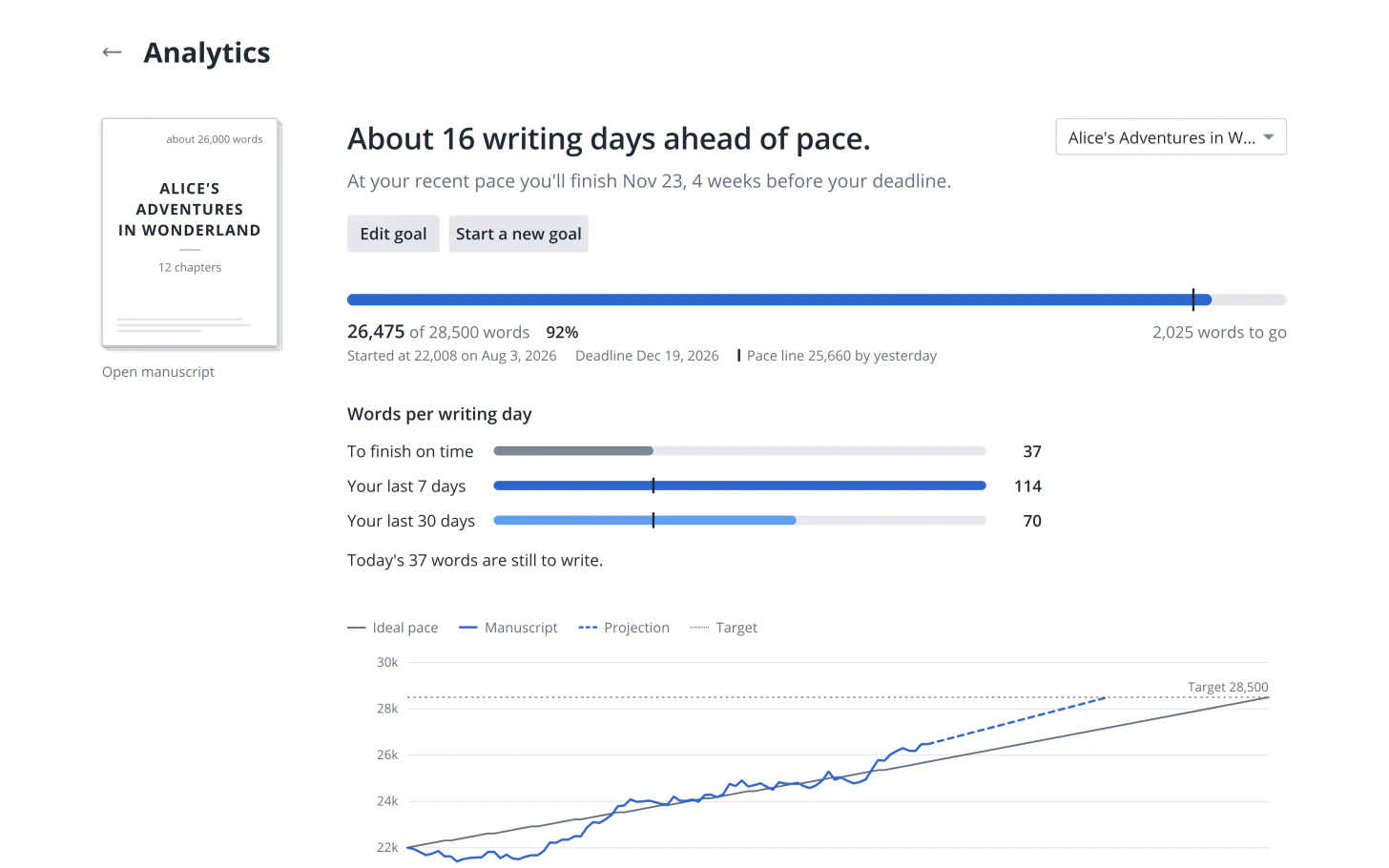
Advanced Analytics. There is a new Analytics page that tells the story of your writing. You can see how a specific project is coming along, how fast you’re moving, and a chart showing where you’re headed. It shows when you write best with a map of your writing hours over your historical data highlighting your most productive day and time. You can look back at your words over time and see how they split across your projects and see which characters show up in which parts of your story, drawn from your plot grid and snippets. Your writing averages and streaks are all there too.
Project goals and goal history. Give any project a word count goal with a deadline if you want one. Novella tells you how much to write today to stay on track, whether you’re ahead or behind, and when you’re likely to finish based on your historical data. Each project’s progress shows right on the home screen and you can look back at the history and streaks for your daily, weekly, and monthly goals.
Novella always keeps track of your writing statistics independent of your plan, so if you upgrade later, your full history is already waiting for you.
Export to Word, PDF and EPUB. When the draft is done, Premium gets it out the door:
- Word: Standard Manuscript Format, ready for agents and publishers, or a clean document styled the way you like
- PDF: a manuscript for submission, or a typeset reading copy in standard book sizes
- EPUB: an ebook with a cover, title page, dedication and more, ready for your e-reader
Plot Grid templates. Start your outline from a classic story structure: Three Act Structure, Save the Cat!, the Hero’s Journey, Seven Point Story Structure or Freytag’s Pyramid. Each one fills your plot grid with the key beats of the story. You can also reference those story structures for inspiration if you don’t want to use one directly.
Novella Cloud
Cloud is an add-on subscription, and it works with either the free version of Novella or Premium.
Your writing is encrypted on your computer before it ever leaves it, so the backups are readable by you and nobody else, me included. Cloud also syncs your projects across multiple devices so you can write on one computer and pick up right where you left off on another. If you’re writing offline, your changes sync as soon as you’re back online. You can cancel any time and your local data is unaffected, Novella will merely stop syncing and backing up your data.
The pricing page has the details on both.
New for everyone
This is the part I’m most excited about, because it’s for every Novella writer, free or not.
Writing goals. Set a daily, weekly, or monthly word count goal. (or all three!) Choose which days are your writing days. Rest days don’t count against you and your streaks. Today’s progress shows in the writing sidebar and on the home screen.
Split screen. Open two chapters side by side so you can look back at one while you write the other.
Scene breaks. Add a scene break from the toolbar, or type *** on its own line and press Enter. When exporting your project you can choose how those scene breaks are reflected.
Faster find and replace. Press Enter to jump to the next match and Shift+Enter to go back. Pressing Enter in the replace field replaces the current match.
Plot grid writing counts. The words you write in plot grid snippets can now count toward your word count. It’s your choice, so if you’d rather keep outlining out of your daily total, you can.
Export to Markdown and plain text. The new Export Project option in the File menu or from your project list exports your project to Markdown or plain text as a single file or one file per chapter. Both formats are incredibly widely used, so it’s easy to take your writing into another tool whenever you want to. Your words are always yours and never locked into Novella.
Look and feel. A nice visual refresh, your home page projects now look like the title pages of your manuscripts with the word count, chapters, goal progress, and when you last wrote. Redesigned notifications and menus throughout the app and plenty of dark mode improvements, including text selection in the editor that’s much easier to read.
Fixes
- Deleting the last chapter in a project no longer crashes the app
- Find matches exactly what you type, punctuation included
- Going to the previous match in find now wraps around to the last one
- The Real-time word count setting works as expected
- Words on either side of a line break are no longer counted as one word
- Tooltips no longer make the page jump while you scroll
- Lots of smaller fixes, plus security and stability improvements
Good to know
Novella now requires macOS 13 (Ventura) or later. If your Mac is on an older version, you are welcome to keep using Novella 1.3.0.
Thank you to everyone who has written with Novella, sent feedback, and stuck with it while this update came together. Download Novella 1.4.0 and happy writing!